
Free and open sourceMIT OR Apache-2.0
Speed ramps for DaVinci Resolve, one click each.
Put the playhead on a clip, press a preset, and the ramp lands on your timeline as ordinary Fusion nodes. Shape it in a curve editor. Motion blur that follows the ramp, transition effects, animated captions and beat markers come with it. Works with Resolve Studio and the free Resolve.
Windows installer on the Releases page. On macOS or Linux, build from source.
Preset
Fast-Slow-Fast
- speed
- 1.00x
- source frame
- 45 / 90
source clip, frame 0frame 90
Live, not a recording: the same curve maths the app uses. Pick a preset (keys 1-9) or hover the curve to scrub.
What is in it
Everything a ramp edit needs, nothing else.
Ramps, blur and transitions on one clip share a single Fusion chain: ramp, then blur, then transitions. Re-apply a ramp and the effects after it stay.
Graph
Speed ramps you can keep shaping
12 built-in presets on keys 1-9: Fast-Slow-Fast, Slow-Fast-Slow, Speed Up, Mid Reverse, 2-Push, Boomerang and more. Then drag anchors and handles in the curve editor, with a speed lane under it that shows where the clip runs slow, fast or backwards.
Hit a marker moves the ramp's slowest point or turnaround onto a timeline marker. Nearest, Frame blend or Optical flow. It reads back a ramp that is already on the clip.
Motion blur
Blur that follows the ramp
Zoom blur with a draggable pivot, or directional blur with an angle. Keyed to the clip's speed: slow parts stay sharp, fast parts smear. Detect direction reads the motion in the shot.
Transitions
Ten effects, stackable
Each has its own switch and settings. Peak at the start, middle or end. The envelope is a Fusion expression of the clip's length, so lengthening the clip re-times the effect without running anything.
- Shake
- Warp
- Aberration
- Glow
- Zoom punch
- Exposure flash
- RGB split
- Lens distortion
- Whip-pan blur
- Film-grain hit
Captions
Animated, and right to left too
From Resolve's own transcription or from an SRT or your own lines, as animated Fusion text. 10 looks, word-by-word entrances, safe-zone aware 9:16 layout. Sorani and Arabic join correctly. Optional sound per word from 18 built-in sounds.
word-by-word entrance, one word emphasised
Right to left, joined
ەێۆڵڕ
The letters Sorani needs, in Vazirmatn. Words join and run right to left.
Beat markers
Markers from the music
Detects the beats and downbeats of the music on your timeline and drops blue and red markers. Every beat, every other beat or downbeats only, with a double/half-tempo fix. It never touches your own markers.
Batch
One ramp, every selected clip
Select the clips, pick a ramp, apply. Optionally reverse every other one. Save your own presets as plain JSON and share them.
same preset on every selected clip, every other one reversed
The app
A small window next to Resolve.
OpenRamp is a desktop app, not a page you have to leave the edit for. It follows the playhead and shows the clip it will act on.
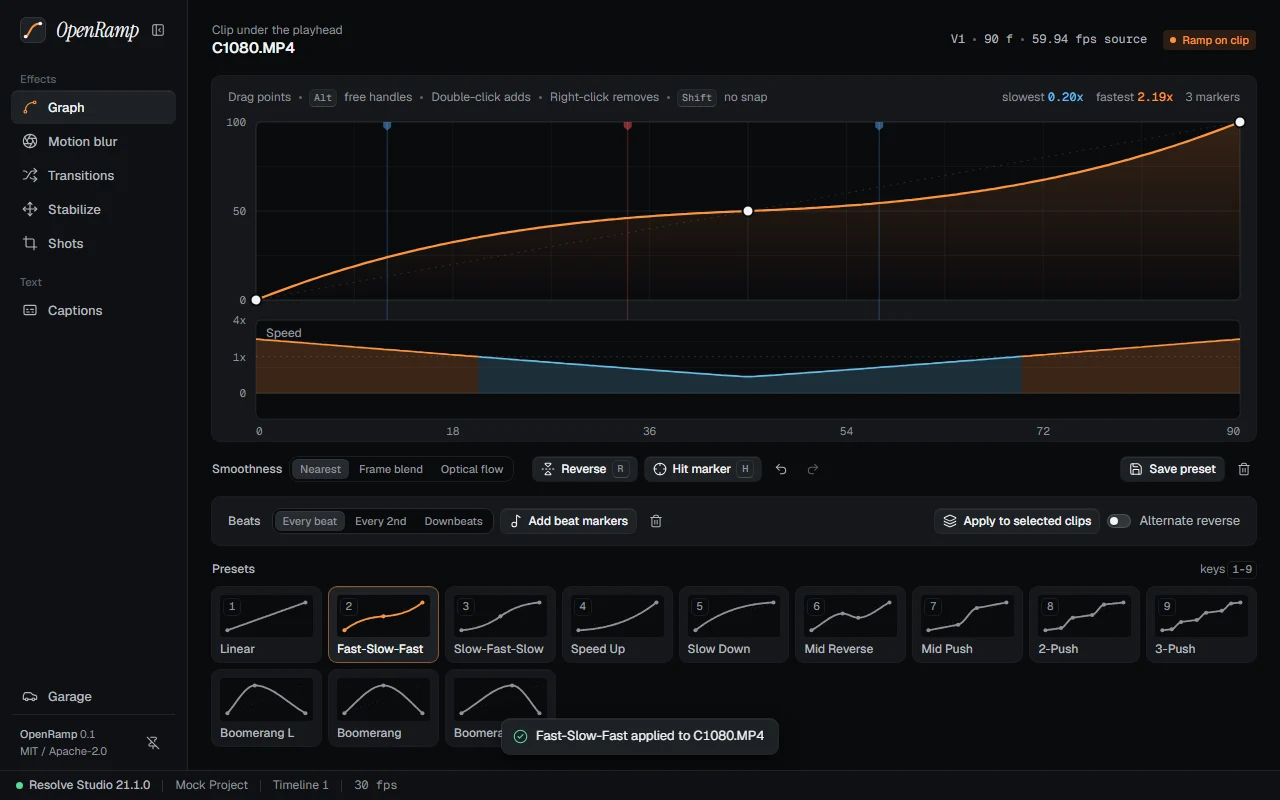
Curve, speed lane, presets
The clip under the playhead, its curve, and the speed it implies. Presets sit underneath on keys 1-9; beat markers and batch apply are one row above them.
Screenshots of the real app UI running against a mock Resolve project.
How it works with Resolve
It lands as plain nodes.
Resolve's scripting API has no call for variable speed. So OpenRamp builds each ramp as a Fusion comp on the clip, with a TimeStretcher whose source time gets one key per frame.
- 1
Playhead on a clip
OpenRamp targets the clip under the playhead and shows its current ramp, if it has one.
- 2
Press a preset
Or draw the curve yourself. Edits apply live.
- 3
Keep editing in Resolve
The result is ordinary Fusion nodes and markers. Open them, change them, delete them. No OpenRamp needed.
The comp on your clip
- MediaIn1your clip
- OpenRampFlowoptical flow, if chosen
- OpenRampTimeTimeStretcher, SourceTime spline
- OpenRamp...blur, transitions
- MediaOut1back to the timeline
- Frame exact
- Tested against a frame-numbered clip: largest error under half a frame.
- One maths
- Rust, TypeScript and Python run the same curve code, checked against one fixture file.
- Two ways in
- From Workspace > Scripts (free and Studio), or on its own with Studio's external scripting.
Install
Three steps, then it is in Resolve.
Windows installer
- 1Download
OpenRamp_x.y.z_x64-setup.exefrom the Releases page. - 2Run it. It also copies
OpenRamp.pyinto Resolve's Fusion Scripts/Utility folder. - 3In Resolve open Workspace > Scripts > OpenRamp. The app opens and connects.
Resolve Studio can also start OpenRamp on its own: set Preferences > System > General > External scripting using to Local.
From source
Needs Rust (stable), Node 20+, pnpm, Python 3.10+ and DaVinci Resolve 21. ffmpeg must be on your PATH for Captions.
$ git clone https://github.com/Seganation/openramp$ cd openramp$ pnpm install$ pnpm dev
# installer lands in target/release/bundle$ pnpm build
The UI alone runs in a browser against a mock Resolve: pnpm --filter @openramp/ui dev.
Open source
A foundation to build on.
OpenRamp is free to use, change and ship, under MIT or Apache-2.0, your pick. Presets are plain JSON and the bridge speaks one JSON object per line, so any script can drive it.
The curve maths, the Fusion chain and the design system are the base. A new feature is a Python module, a UI folder and a test.
Repository
apps/desktop/        Tauri 2 app: Rust shell + React 19 UI
  ui/src/ui/         design system: tokens, primitives
  ui/src/features/   one folder per tab
crates/or-core/      curve maths and presets in Rust
bridge/              JSON-RPC bridge to Resolve (Python)
  orb/<feature>.py   one module per feature
integrations/resolve OpenRamp.py: the Workspace > Scripts entry
presets/             built-in presets, plain JSON
atlas/               every Fusion tool and input, read from Fusion
Adding a feature
- 1
bridge/orb/<feature>.pyexportsMETHODS - 2
ui/src/features/<feature>/with the tab, then flip itsREADYflag - 3A test: unit tests for pure logic, an end-to-end script for what must run inside Resolve
$ pnpm test